 kinetis
Avast antivirus explained: what it does, its privacy record, and who it suits
Avast is one of the best-known names in consumer antivirus. This guide covers what its products do and how real-time protection works, where the company's privacy history calls for caution, and how to decide whether you need a paid suite at all. We describe features as Avast publishes them and point you to independent sources. We do not use invented ratings or testimonials.
Key points
- Avast makes a free desktop antivirus and several paid suites. Which features you get depends on the plan and the platform.
- Windows already includes Microsoft Defender Antivirus. A third-party product is a choice, not a requirement.
- In 2024 the US Federal Trade Commission and the Czech data-protection authority both acted against Avast over the sale of users' browsing data through its former subsidiary Jumpshot. Take this into account before you decide.
- Check current prices, renewal terms and features on Avast's own website. If they differ from this page, Avast's information prevails.
Why online protection still matters
Phishing, ransomware and credential theft are among the threats that Europe's cyber-security agency ENISA consistently lists as prominent in its annual Threat Landscape reports. Most attacks on ordinary people are not sophisticated. They rely on a convincing email, a fake login page, an out-of-date app or a reused password.
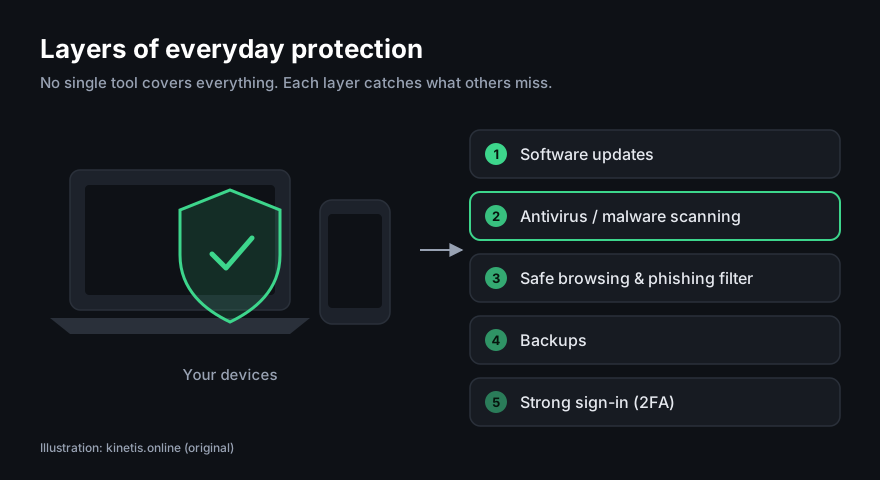
Antivirus software addresses part of this risk. It can detect and block known malicious files and suspicious behaviour, and many products also warn you about dangerous websites. It cannot stop you typing your password into a convincing fake page, and it does not replace software updates or backups. That is why this guide treats antivirus as one layer among several and not as a complete answer.
Who is behind Avast
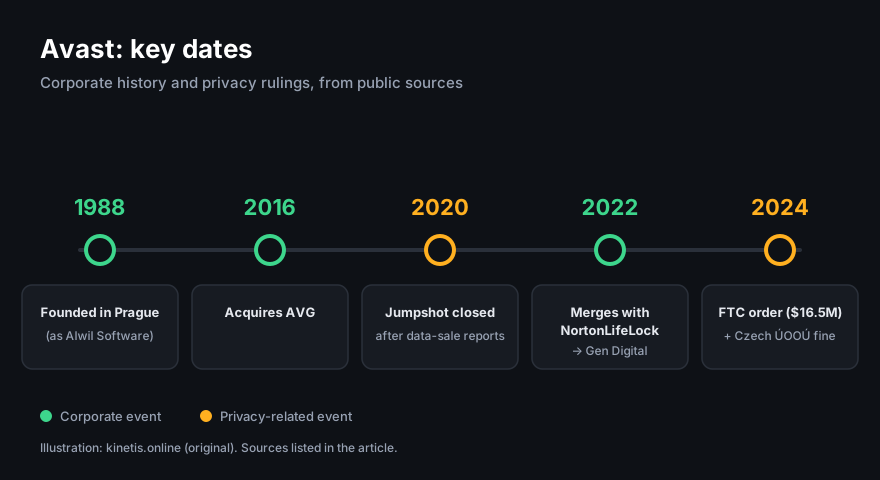
Avast started in 1988 in Prague, founded by Pavel Baudiš and Eduard Kučera. The company was originally called Alwil Software and later took the name of its product. In 2016 Avast acquired AVG, another antivirus brand. In 2022 Avast merged with NortonLifeLock, and the combined group now operates as Gen Digital. Avast, AVG and Norton therefore belong to the same corporate group, even though they are still sold as separate brands.
What the products include
Avast sells a range of products, and their names and bundles change over time. In general terms:
- Free antivirus (desktop). Real-time malware scanning, on-demand scans and basic web protection. The free edition shows offers for paid upgrades.
- Paid security suites. These add extra protections. Depending on the plan and operating system, that can include an enhanced firewall (Windows), ransomware-specific protection, webcam access controls and fake-website protection.
- VPN. Avast's VPN (SecureLine) is sold separately or included in some bundles. A VPN encrypts traffic between your device and the VPN provider. It does not make you anonymous, and it does not protect you from malware.
- Browser. Avast Secure Browser is a separate, free Chromium-based browser.
- Multi-device plans. Some subscriptions cover several devices across Windows, macOS, Android and iOS. The features on iPhone and iPad are much narrower, because iOS does not let apps scan other apps.
An earlier version of this page described Avast as "one subscription" that includes a firewall, password manager, VPN and browser. That was misleading. The free edition does not include all of these, and bundles differ by plan. Always check the feature list of the exact plan on Avast's website before you buy.
Partner link: if you buy through it, DAR STAR s.r.o. may earn a commission. This costs you nothing extra and does not change the price you pay.
How real-time scanning works
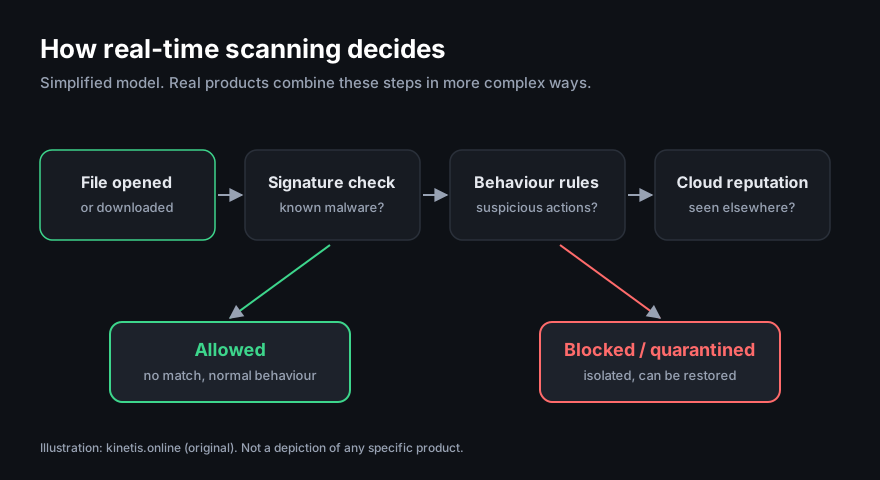
Modern antivirus products, Avast included, combine several detection techniques. Vendors describe these in their own words, but the broad approach is common across the industry:
- Signature matching. A file is compared against fingerprints of known malware. This is fast and precise, but only for threats that have already been seen.
- Heuristics and behaviour monitoring. The software looks for suspicious traits or actions, such as a program suddenly encrypting many documents. This can catch new variants, but it sometimes flags legitimate software (a "false positive").
- Cloud reputation. Information about unknown files or websites may be checked against the vendor's online service. This speeds up detection, but it means some data about files and URLs is sent to the vendor. Your settings and the vendor's privacy policy control how much.
- Action. A threat is blocked, quarantined (isolated so you can restore it if it turns out to be harmless) or deleted.
No product detects everything. Independent tests show that detection rates for well-known products are generally high but not perfect, and they vary from test to test. Be wary of any claim of "100% protection".
Avast's privacy record
A security product runs with deep access to your device, so the vendor's handling of data matters. Avast's record here includes a serious episode that readers should know about.
- Jumpshot (to 2020). Avast's subsidiary Jumpshot sold data derived from users' browsing to third parties. It closed in January 2020 after press investigations.
- US FTC order (2024). In February 2024 the US Federal Trade Commission announced an order requiring Avast to pay $16.5 million. The order also bans the company from selling or licensing browsing data from its software for advertising purposes. The FTC said Avast had collected and sold this data while telling users its products protected their privacy.
- Czech data-protection authority (2024). The Czech Office for Personal Data Protection (ÚOOÚ) announced a fine of about CZK 351 million against Avast for unlawfully transferring personal data of users to Jumpshot.
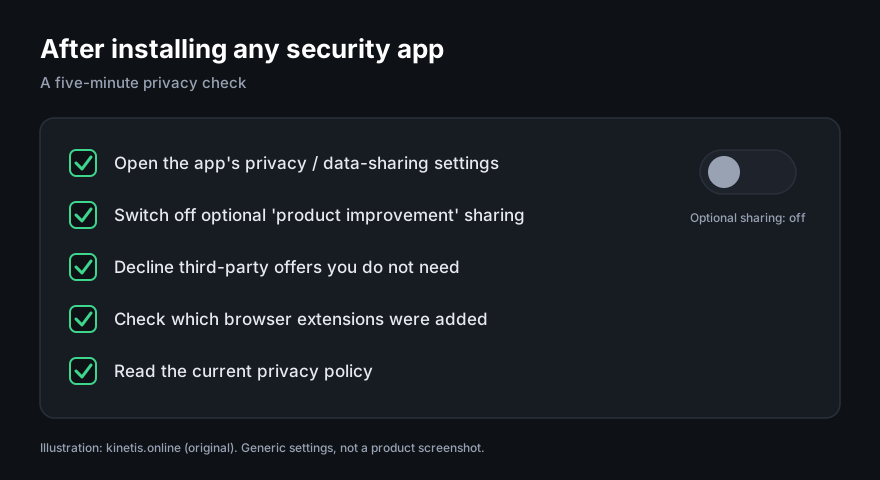
The earlier version of this page called Avast "privacy-respecting" and implied that only competitors had privacy problems. That was not accurate, and we have removed it. What you do with this history is your decision. If you use Avast, open its privacy settings after installing and switch off any optional data sharing you do not want, and read its current privacy policy.
Free, paid or built-in?
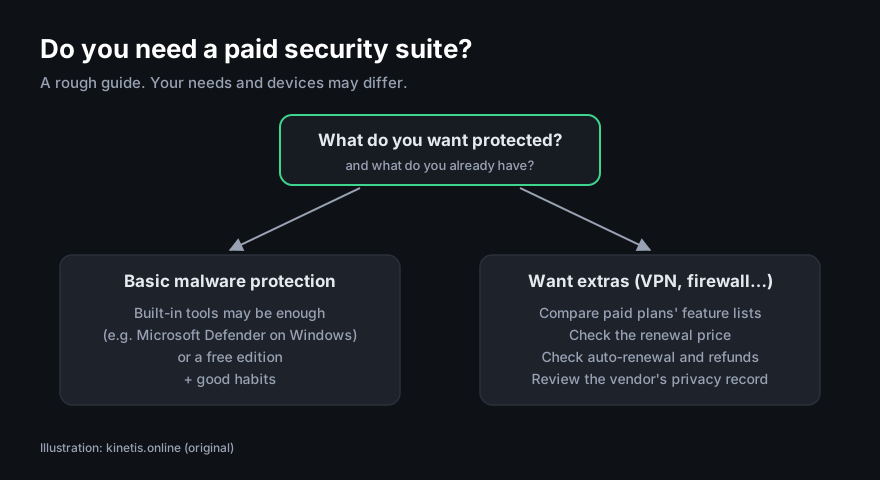
Before you pay, consider what you already have:
- Windows 10 and 11 include Microsoft Defender Antivirus, which is switched on by default when no other antivirus is installed. Independent labs regularly test it alongside commercial products.
- macOS includes built-in protections (Gatekeeper, XProtect). Many Mac users add third-party antivirus for extra detection or web protection.
- Android includes Google Play Protect. Third-party apps can add scanning and web filtering.
- iOS sandboxes apps, so "antivirus" apps on iPhone mainly offer web filtering, VPN and account-breach alerts.
A paid suite can make sense if you want its extra features in one place, such as a firewall with more controls, a VPN or web protection across several devices, and you are comfortable with the vendor. If you only want basic malware protection on Windows, the built-in option or a free edition may be enough.
Reading independent tests
Laboratories such as AV-TEST (Germany) and AV-Comparatives (Austria) regularly publish protection, performance and false-positive results for many products, including Avast. We do not reproduce their scores here, because they change with every round of testing and older numbers quickly become misleading. When you read a report:
- check the date and the exact product version tested;
- look at false positives as well as detection. A product that blocks everything can be as frustrating as one that misses threats;
- look at the performance impact on hardware similar to yours. The earlier claim on this page that Avast "does not slow down your machine" was a marketing statement and we have removed it. Impact depends on your device and settings.
Who it suits and who may prefer something else
May suit you if…
- you want a free desktop antivirus with a familiar interface;
- you prefer several tools (for example antivirus and VPN) from one vendor;
- you are happy to review privacy settings after installing.
Consider alternatives if…
- the vendor's past handling of browsing data is a deal-breaker for you;
- you dislike upgrade prompts in free software;
- you are satisfied with the protection built into your operating system.
Installing it safely
- Download only from the official website or your device's official app store. Fake "antivirus" downloads are a common way to spread malware.
- Remove other antivirus products first. Two real-time scanners running together can conflict. Windows turns off Defender's real-time scanning when another antivirus registers itself.
- Read each installer screen. Security installers may offer optional extra products, such as a browser. Untick anything you do not want.
- Check the price after the first year. Introductory prices are often lower than renewal prices, and subscriptions usually renew automatically. You can normally turn automatic renewal off in your account.
- Know your withdrawal rights. In the EU you generally have 14 days to withdraw from an online purchase. For digital content and services this right can be lost once you have agreed to start using it immediately, so read the seller's terms.
- Review the settings, especially data-sharing options, as described above.
Partner link: if you buy through it, DAR STAR s.r.o. may earn a commission. This costs you nothing extra and does not change the price you pay.
Beyond antivirus: habits that matter more
No antivirus product can make up for the basics. These steps cost nothing and prevent a large share of everyday incidents:
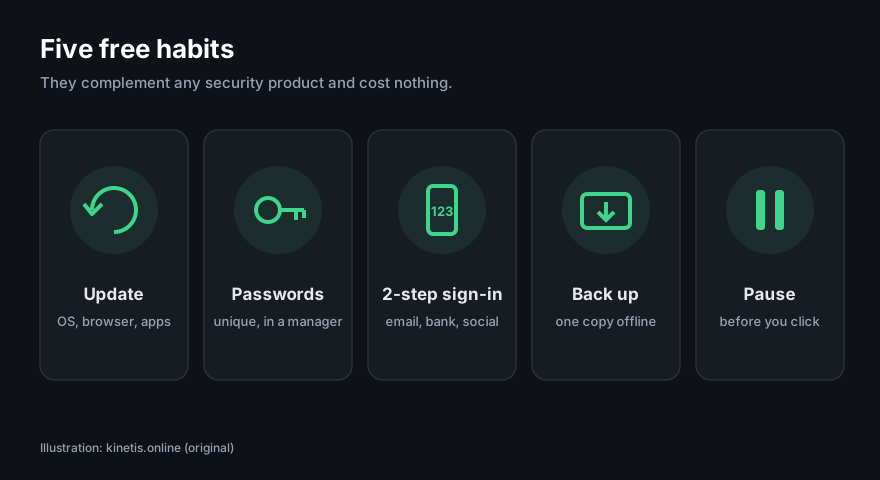
- Update your operating system, browser and apps promptly.
- Use unique passwords stored in a reputable password manager.
- Turn on two-step verification for email, banking and social media.
- Back up important files to an external drive or cloud service, with at least one copy disconnected from your computer.
- Slow down with unexpected messages. See our guide to spotting phishing.
Frequently asked questions
Is Avast free?
Avast offers a free antivirus edition for desktop. Paid plans add features. Check Avast's website for the current line-up and prices.
Do I need antivirus on Windows if I have Microsoft Defender?
Not necessarily. Defender provides baseline protection. Third-party suites add features and a different detection engine. Many people find the built-in protection sufficient when combined with good habits.
Is Avast still selling browsing data?
Jumpshot was closed in 2020, and the 2024 FTC order bans Avast from selling or licensing browsing data from its products for advertising. We cannot audit any company's internal practices. Read Avast's current privacy policy and review the settings.
Is Avast the same company as AVG and Norton?
They are separate brands owned by the same group, Gen Digital.
Does kinetis.online get paid if I buy?
Possibly. Buttons marked "Partner link" are affiliate links. If you buy through one, DAR STAR s.r.o. may receive a commission. You pay nothing extra. It does not affect what we write. See our editorial policy.
Sources
We used the following public sources. Their URLs were current when we wrote this article.
- US Federal Trade Commission, press release, 22 February 2024: "FTC Order Will Ban Avast from Selling Browsing Data for Advertising Purposes, Require It to Pay $16.5 Million". ftc.gov
- Úřad pro ochranu osobních údajů (Czech Office for Personal Data Protection), announcement of the fine against Avast Software s.r.o., 2024. uoou.gov.cz
- Gen Digital, company information and history. gendigital.com
- Avast, official product pages and privacy policy. avast.com
- ENISA, Threat Landscape reports. enisa.europa.eu
- AV-TEST, test results for home users. av-test.org
- AV-Comparatives, consumer test reports. av-comparatives.org
- Microsoft, "Microsoft Defender Antivirus in the Windows Security app". support.microsoft.com
- European Commission, Your Europe: "Guarantees and returns / right of withdrawal". europa.eu
Partner link: if you buy through it, DAR STAR s.r.o. may earn a commission. This costs you nothing extra and does not change the price you pay.