 kinetis
How to spot a phishing message
Phishing messages try to trick you into revealing a password, paying money or installing malware. They arrive as emails, text messages (sometimes called "smishing"), social-media messages or phone calls. This guide lists the most common warning signs.
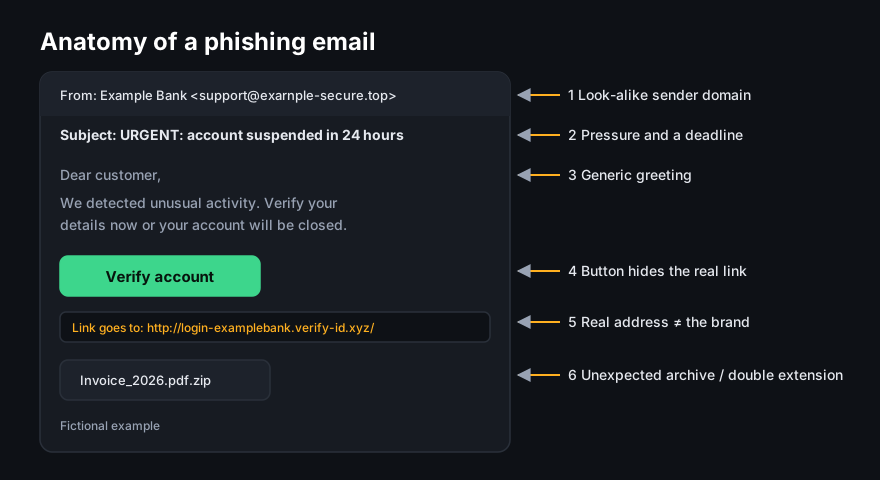
Warning signs
- Pressure and urgency. "Your account will be closed today", "Payment failed – act now".
- Mismatched sender. The display name says your bank, but the actual address is from an unrelated domain.
- Links that do not go where they say. On a computer, hover over a link to see the real address. On a phone, press and hold the link. Look closely at the domain name, the part just before the first single "/".
- Requests for credentials or codes. Legitimate organisations do not ask you to send passwords or one-time codes.
- Unexpected attachments, especially archives (.zip), Office files that ask you to "enable content", or files with double extensions.
- Generic greetings and odd wording, although modern phishing can be well written, so do not rely on spelling mistakes alone.
What to do instead
- Do not use the link in the message. Open the organisation's app, or type its address yourself.
- If a message claims to come from someone you know and asks for money, contact them through another channel you already trust.
- Report the message using your email provider's "report phishing" option.
If you already clicked
- If you entered a password, change it straight away on the real site, along with any other account where you used the same password.
- Turn on two-step verification for that account.
- If you shared card or bank details, contact your bank immediately using the number on your card.
- If you opened an attachment, run a full scan with your security software and keep your system updated.
- Consider reporting the incident to your national cyber-security or police reporting service.
Sources
- ENISA, phishing and social-engineering awareness material. enisa.europa.eu
- UK National Cyber Security Centre, "Phishing: spot and report scam emails, texts, websites and calls". ncsc.gov.uk
- Národní úřad pro kybernetickou a informační bezpečnost (NÚKIB), Czech Republic. nukib.gov.cz
This page contains no partner links. Illustrations are original works by kinetis.online.